













Welcome to CHI-Exclusive eShop — your one-stop marketplace for African-inspired fashion styles, accessories, household goods, crafts, and unique products. We’re excited to have you on board as a vendor! This guide will walk you through every step of the registration process, vendor dashboard setup, and how to upload your first product using our eShop platform.
🔥 Bonus: Registration is currently FREE for 15 days, so don’t miss the opportunity to get started today!
Step 1: Visit the Vendor Registration Page
- Go to CHI-Exclusive Hub Vendor Registration Page. (My Account)
- Click on “Sign up” or “Become a Vendor”.
- Fill in your details:
- Business name
- Email address
- Password
- Store URL (choose your desired store name)
- Agree to the terms and click “Register”.
Step 2: Complete the Vendor Signup Process
eShop setup process makes it easy to configure your store in just a few steps:
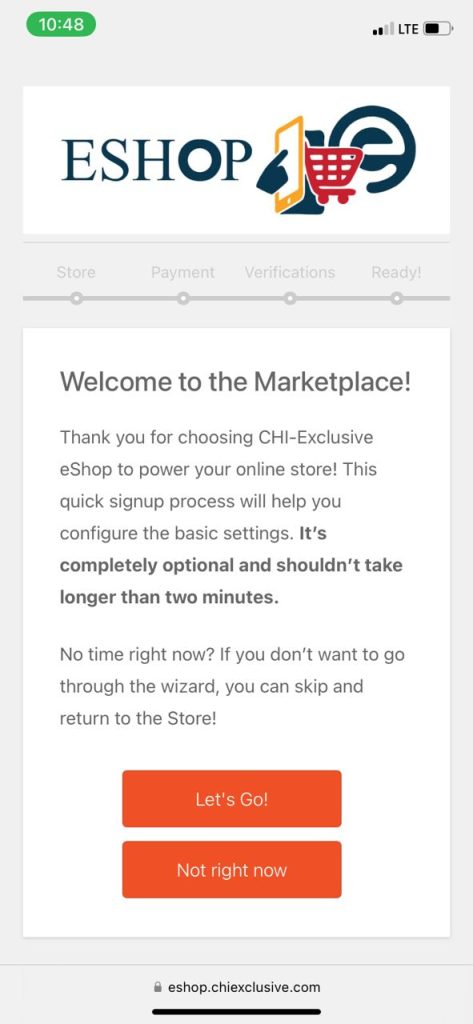
- Store Setup:
- Enter store name, store URL, business address.
- Add a short store description.
- Upload your store logo and banner image.
- Payment Setup:
- Choose your preferred withdrawal method (e.g., Bank Transfer, PayPal).
- Fill in account details for payment.
- Store Policies:
- Add policies for shipping, refund, and cancellations.
- These help build customer trust and clarity.
- Shipping Setup (Optional):
- If shipping physical products, set your delivery zones and rates.
- Click Continue and finish the setup.
🎉 Congratulations! Your store is now live.
Step 3: Access Your Vendor Dashboard
After logging in, you’ll be redirected to your Vendor Dashboard. This is your business control room where you manage your store, products, orders, and settings.
🛒 Step 4: Add Your First Product
Time to showcase your products to the world!
- From your Vendor Dashboard, click on Products > Add New.
- Enter product details:
- Product Name
- Description (full and short)
- Category (select relevant category)
- Price (regular and sale price if applicable)
- Images (upload high-quality product photos)
- Choose Product Type:
- Simple Product (most common)
- Variable Product (for sizes, colors, etc.)
- Inventory quantity (optional)
- Shipping info (if required)
- Click Submit for Review & Publishing
🚀 Once approved, your product will appear on the marketplace!
Bonus Tips for a Successful Vendor Launch
- Add a compelling store banner and logo to establish your brand identity.
- Use quality images and clear descriptions to boost sales.
- Share your store link on social media to drive traffic.
- Respond promptly to customer inquiries to build trust and get positive reviews.
Final Thoughts
Getting started on CHI-Exclusive Hub is easy, especially with the help of eShop’s intuitive vendor system. Whether you’re a fashion designer, artisan, or entrepreneur, this platform is built to help you succeed online.
Don’t forget — this first 15 days are absolutely free registration, so take advantage of this offer and start building your online empire today!
Need help? Contact our support team via [eshop@chiexclusive.com or WhatsApp live chat].